
Component State
Pass component state to Tambo as context for following user messages.
By default, React component state is private and invisible to Tambo. If a user types into a text field and then asks Tambo to "check the grammar of what I typed," Tambo won't know the current value.
Replace useState with useTamboComponentState to give Tambo visibility into your component's state. This does two things:
- AI visibility - State is included in follow-up message context, so Tambo can respond to "edit what I typed" requests
- Rehydration - State persists when re-rendering thread history
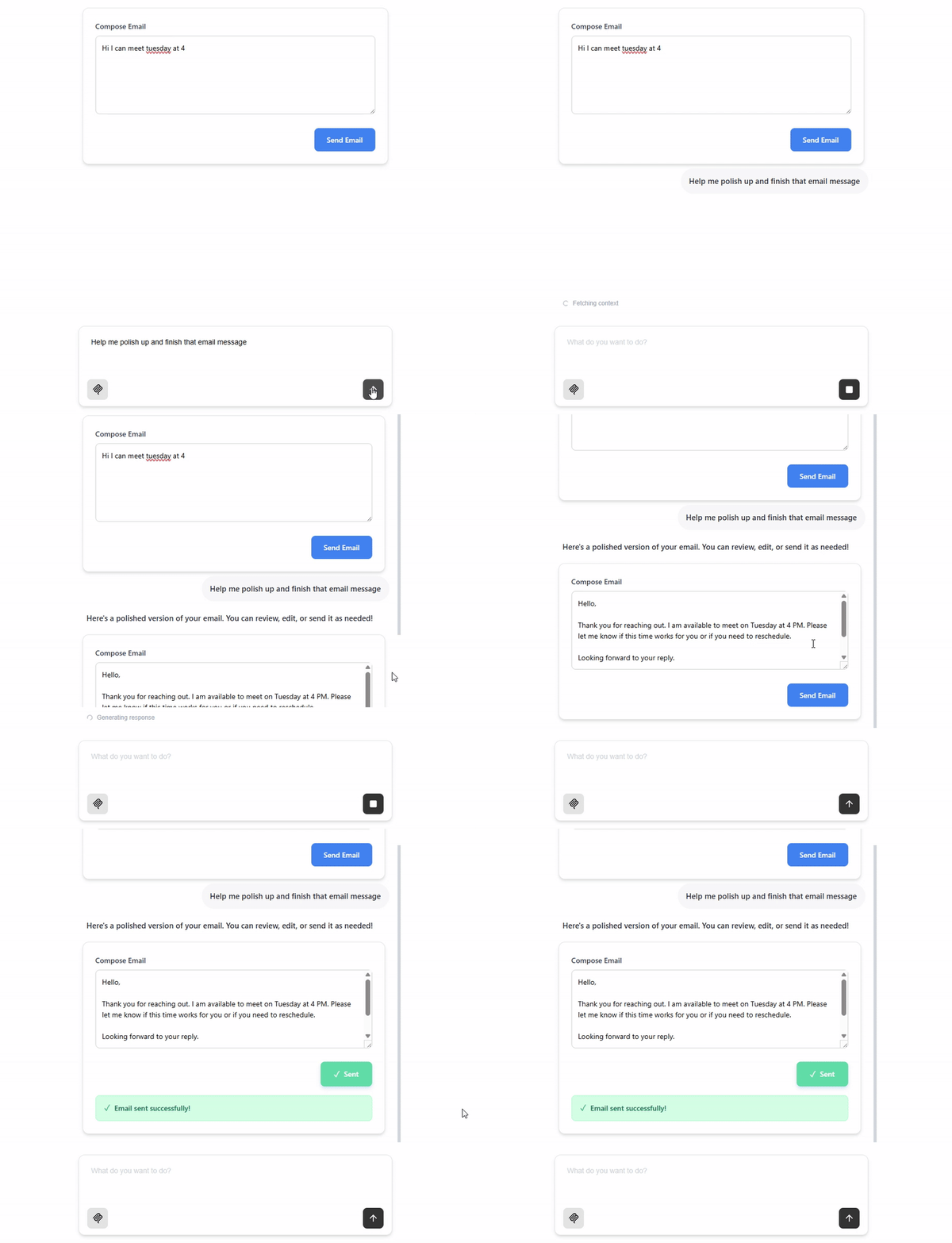
Tracking State with useTamboComponentState
Consider this simple React component that allows a user to update an emailBody field, and tracks whether the email has been sent:
export const EmailSender = () => {
  ...
  const [emailBody, setEmailBody] = useState("") // tracks the message being typed
  const [isSent, setIsSent] = useState(false) // tracks whether the 'send' button has been clicked
  ...
}
If Tambo renders this component and the user edits the emailBody field, Tambo will not know about the edit. A following user message like "Help me edit what I've typed so far" will not generate a relevant response.
To allow Tambo to see these state values, simply replace useState with useTamboComponentState, and pass a keyName for each value:
import { useTamboComponentState } from "@tambo-ai/react";

export const EmailSender = () => {
  ...
  const [emailBody, setEmailBody] = useTamboComponentState("emailBody", "");
  const [isSent, setIsSent] = useTamboComponentState("isSent", false);
  ...
}
Now tambo will know the current values of emailBody and isSent.
State Rehydration
When using generative components, your component is rendered as part of a message in a thread. Tambo persists component state values remotely when using useTamboComponentState, so when the thread is reloaded later, the component is re-rendered with the persisted state values.
For example, if a user:
- Asks Tambo to generate an email component
- Types "Hello, let's schedule a meeting" into the email body
- Closes the app and returns later
When they reopen the thread, the email component will be re-rendered with emailBody set to "Hello, let's schedule a meeting" - the state is automatically restored from the persisted thread data.
This rehydration happens automatically when using useTamboComponentState. The hook reads the persisted state value for the given keyName when the component first mounts, ensuring user edits and interactions are preserved across page reloads and thread navigation.
Updating editable state from props
Often when we have an editable state value, like the emailBody above, we want Tambo to be able to generate and stream in the initial value. If a user sends "Help me generate an email asking about a good time to meet," Tambo should be able to fill in the value with relevant text, and then the user should be able to edit it.
When using useState this can be done by adding a useEffect that updates the state value with prop value changes:
export const EmailSender = ({ initialEmailBody }: { initialEmailBody: string }) => {
  ...
  const [emailBody, setEmailBody] = useState("") // tracks the message being typed
  const [isSent, setIsSent] = useState(false) // tracks whether the 'send' button has been clicked

  useEffect(() => {
    setEmailBody(initialEmailBody)
  }, [initialEmailBody])
  ...
}
However, when using useTamboComponentState, this pattern will cause the initial prop value to overwrite the latest stored state value when re-rendering a previously generated component.
Instead, use the setFromProp parameter of useTamboComponentState to specify a prop value that should be used to set the initial state value:
export const EmailSender = ({ initialEmailBody }: { initialEmailBody: string }) => {
  ...
  const [emailBody, setEmailBody] = useTamboComponentState("emailBody", "", initialEmailBody) // tracks the message being typed, and sets initial value from the prop
  const [isSent, setIsSent] = useTamboComponentState("isSent", false) // tracks whether the 'send' button has been clicked
  ...
}